
When a PCM hardware box (host) is not available, CG FC200 ECU Programmer can serve as a substitute PCM host. It can then connect to various modules and work alongside PCM software.
Requirements:
- FC200 hardware unit
- FC200 software version 1.3.5.0 or higher
- PCM software (either genuine or clone)
- PCM dongle and PCM driver
Setup Instructions:
Download the software from the provided link.
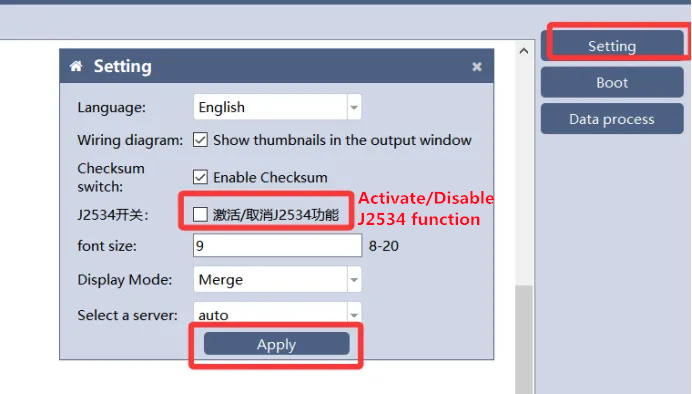
Go to Setting → Activate/Disable J2534 function → Click Apply.
Note: CG manufacturer does not supply the PCM software, dongle, or driver. These items must be purchased separately by the user.
Wiring Information:
Please refer to CG FC200 wiring diagram for connection details.
OBD data reading is supported, but only on vehicles equipped with an OBD port.
Read also:
